
Most Linux distributions fit neatly into one of two camps: the polished mainstream distros that hold your hand through every step, or the minimalist power-user builds that assume you already know what you’re doing. KLV-Airedale sits in neither camp. It is something rarer — a thoughtfully engineered, independently developed distribution that borrows the best ideas from Puppy Linux’s flexibility and marries them to the technical solidity of Void Linux. The result is one of the most resource-efficient and versatile Xfce-based distros available in 2026, and one that deserves far more attention than it currently gets.
What is KLV-Airedale Linux?
KLV stands for Kennel Linux Void. KLV-Airedale Linux is built from Void Linux, which uses a rolling release model, and is fully compatible with Void Linux’s upstream repositories. Despite its connection to the Puppy Linux Discussion Forum — where it was originally developed and is still actively maintained — KLV-Airedale Linux is not a derivative of Puppy Linux, nor is it code-related to Puppy Linux unless the builder purposively makes its desktop look similar or chooses to add some userland utility apps from there.
The name places it in the “Kennel Linux” family alongside its siblings: KLA (Kennel Linux Arch) and KLU (Kennel Linux Ubuntu). Each is built with the same underlying technology — the FirstRib build system — but targets a different upstream package ecosystem. KLV-Airedale is the Void Linux member of the family, and it is the most technically mature of the three.
The latest release as of May 2026 is KLV-Airedale-sr18, running the Void Linux kernel 6.15.9_1.
The technology behind it — FirstRib and OverlayFS
The defining characteristic of KLV-Airedale is not its desktop or its application selection — it is its boot and filesystem architecture, built around the FirstRib initrd system.
KLV-Airedale is built with the FirstRib build system and uses an overlayfs-based initrd to boot. It supports frugal installation, save persistence, layered SFS modules, loading compressed or uncompressed root filesystem layers, and a copy-to-RAM boot option. The distribution is designed to provide the flexibility associated with Puppy-style frugal systems while retaining compatibility with Void Linux and its package ecosystem.
Breaking that down into practical terms:
Frugal installation means the system lives in a small set of files on a partition rather than being spread across thousands of files in the traditional Linux filesystem structure. You can install it on FAT32, NTFS, ext2/3/4, or run it directly from a USB stick — the FirstRib initrd handles the assembly at boot time.
OverlayFS layering means the read-only base system is combined with a writable upper layer at runtime. Your changes, installed packages, and configurations are stored separately from the base system files — making the system easy to snapshot, reset, or extend with additional SFS (SquashFS) modules without touching the core.
Copy-to-RAM (copy2ram) boots the entire system into RAM, freeing the boot media entirely after startup. The result is an OS that runs at RAM speeds and can operate with the USB stick or SD card removed once booted.
The heart of KLV-Airedale is a FirstRib magic initrd which uses overlay filesystem to provide frugal install save persistence, typical load squashfs capabilities — including the currently unique ability to load uncompressed physical directories into the layers hierarchy — and a copy2ram option. LinuxLap
Void Linux under the hood
While the boot architecture comes from FirstRib, everything above it is Void Linux — and that brings a set of technical characteristics that distinguish KLV-Airedale from Debian-based or Arch-based alternatives.
Void Linux is an independent distribution — not derived from Debian, Ubuntu, Fedora, or Arch. It uses the XBPS package manager, which is fast, reliable, and well-maintained. KLV-Airedale uses Void Linux package management through XBPS, meaning the entire Void Linux package repository is available natively — no compatibility layers, no workarounds.
Void Linux also uses the runit init system rather than systemd. Runit is significantly simpler than systemd, uses less memory, and boots faster. For users who have grown frustrated with systemd’s complexity or overhead, this is a meaningful technical advantage.
The rolling release model means KLV-Airedale never has a “version” in the traditional sense — packages are updated continuously from the Void Linux repositories, and the distribution stays current without requiring a full reinstall every two years.
The Xfce desktop — efficient by design
Among those who have tested many Xfce-based desktop distros — including the excellent Ubuntu-based Zorin Lite and the Arch Linux-based EndeavourOS — KLV-Airedale stands out as the most efficient Xfce desktop distribution in terms of low CPU load and initial RAM used after boot, being half that of most others investigated.
That is a striking claim, and it is backed by the combination of factors that make KLV-Airedale unusual: runit instead of systemd, a minimal base without the background services that most mainstream distros run by default, and a carefully curated application selection that avoids bloat without sacrificing usability.
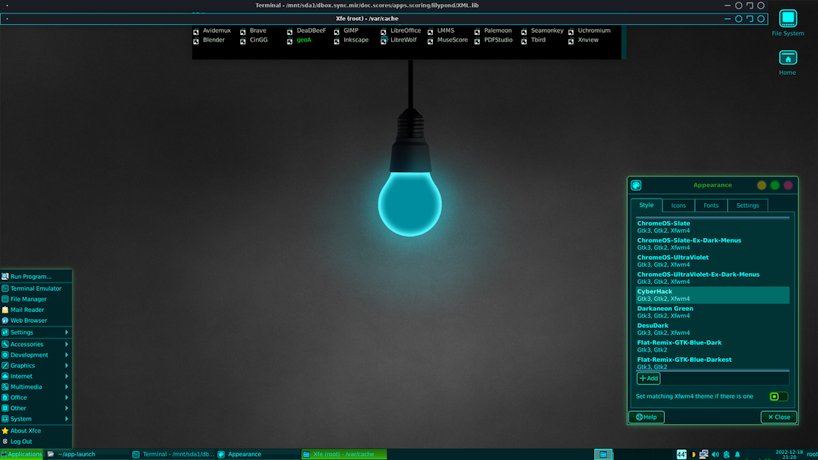
The Xfce desktop in KLV-Airedale Linux includes tiling window management configured via the Super key combined with arrow keys — a practical addition for keyboard-driven workflows that many Xfce users add manually but rarely find pre-configured out of the box.
Who built it and why
KLV-Airedale Linux was built by rockedge (Erik), admin and owner of the Puppy Linux Discussion Forum, via a plugin mainly of his own creation. Additional utility apps were contributed by fredx181 (Fred), maintainer and lead developer of the DebianDog distributions. The wider development community around FirstRib — including contributors wiak, Sofiya, and geo_c — has continued to extend and refine the distribution across dozens of release candidates and stable releases.
The project started as a personal build and has matured into a genuinely polished distribution with an active user base, regular kernel updates, and a growing collection of community-contributed tools and configurations.
Ventoy compatibility and persistence
KLV-Airedale is Ventoy-compatible, achieved via the FirstRib initrd. Save-on-demand persistence is supported for any FR initrd-based distro — the system asks whether you want to save the session at shutdown, and changes are stored in a dedicated Sessions folder on the persistence partition.
This makes KLV-Airedale an excellent candidate for a Ventoy USB setup where multiple distros coexist on a single drive — each with its own independent persistent storage, managed automatically by the FirstRib initrd without any manual configuration.
Hardware requirements
KLV-Airedale is built with an Xfce4 desktop and is described as a powerhouse in a small package. Based on community testing, practical minimum requirements are:
| Component | Minimum | Recommended |
|---|---|---|
| CPU | x86_64, any speed | Dual-core 1.5GHz+ |
| RAM | 512MB (frugal) | 1GB+ (copy2ram: 2GB+) |
| Storage | ~500MB (frugal install) | 2GB+ for persistence |
| Architecture | x86_64 only | x86_64 |
Note that copy2ram mode requires enough RAM to hold the entire compressed system in memory — 2GB RAM is the practical minimum for comfortable copy2ram operation.
Where to get KLV-Airedale Linux
KLV-Airedale is available from two sources:
- Official site: klv-airedale.rockedge.org
- SourceForge: sourceforge.net/projects/klv-airedale
The SourceForge page hosts all release versions including sr18, checksums, and release notes. The Puppy Linux Discussion Forum hosts the most active development thread where rockedge announces new releases and the community provides support.
Who should use KLV-Airedale?
KLV-Airedale Linux is not for everyone. It rewards users who are comfortable with the Linux terminal, curious about alternative init systems, and interested in a distribution that does things differently at a fundamental level. If you have never used Linux before, start with Linux Mint or Lubuntu and come back to KLV-Airedale once you have your bearings.
For the right user, though, it is exceptional. It is the ideal choice for:
Old hardware enthusiasts who want Void Linux’s rolling release freshness with half the RAM overhead of typical Xfce distros. Portable computing fans who want a full Linux system that lives on a USB stick, boots into RAM, and leaves no trace on the host machine. Void Linux users who want Puppy-style frugal install flexibility without giving up XBPS and the Void package ecosystem. Tinkerers and builders who want to understand how a Linux system is constructed at the initrd level — the FirstRib architecture is well-documented and educational.
Final verdict – KLV-Airedale Linux
KLV-Airedale is exactly the kind of distribution that the Linux community is better for having — independently developed, technically innovative, and built by people who genuinely love what they are making. With a bit of further polish, KLV-Airedale really deserves better exposure to the Linux community as a whole. The sr18 release running kernel 6.15.9_1 is the most stable and capable version yet, and with its DistroWatch listing now active and LinuxLinks coverage arriving this week, that exposure may finally be coming.
If you have an old laptop gathering dust, a spare USB stick, and a curiosity about what Linux can do when it is built lean and purposefully — KLV-Airedale Linux is worth an afternoon of your time.

Fortnite on Linux: Release Date, Requirements and Which Distros Will Work
Short answer: Epic Games confirmed on October 14, 2026 that Fortnite is coming to Linux, but there’s…

Best Linux Distro for Developers in 2026: 7 Top Picks by Use Case
The best Linux distro for developers is Ubuntu LTS for compatibility, Fedora Workstation for up-to-d…

Immutable Linux Distros Explained: The Image-Based OS Revolution in 2026
Immutable Linux distros have moved from a niche experiment to a mainstream desktop option in 2026. F…

GhostLock: A 15-Year Linux Kernel Bug Has a 5-Second Public Root Exploit
A Linux kernel vulnerability that has been hiding in plain sight since 2011 was publicly disclosed o…

How to Install Linux on a Laptop: A Step-by-Step Guide – 2026
Switching to Linux can breathe new life into an aging laptop, boost your privacy, and hand you full …

Pedit COW Explained: The Linux Kernel Flaw Letting Local Users Become Root
A new Linux kernel vulnerability nicknamed “pedit COW” has become one of the biggest sec…