Linux distributions have experimented with AI before—but most of them treat it like an add-on.
Deepin 25.1 takes a very different approach.
Instead of bolting AI onto the side, this release weaves it directly into the operating system experience. And for the first time, it feels less like a feature—and more like a core part of how you interact with your desktop.
AI Moves From Gimmick to System-Level Feature
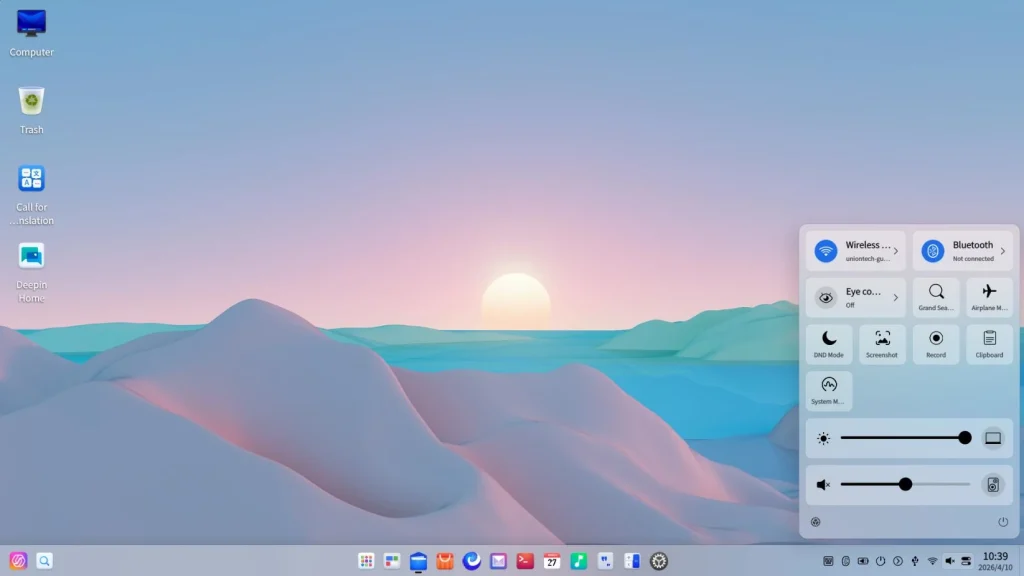
The biggest story in Deepin 25.1 isn’t the kernel update or UI polish. It’s the evolution of what the developers call UOS AI.
This is no longer just a chatbot sitting in a window.
It’s becoming an operating layer.
At the center of this shift is something called “Claw Mode”—a system-level AI control mechanism that allows users to operate their computer using natural language commands. Want to open apps, organize files, or tweak system settings? You can now do it by simply describing the task.
That’s a subtle but important change:
you’re no longer just using software—you’re instructing it.
The AI Writing Tool That Actually Feels Useful
Deepin’s rebuilt AI writing assistant is another standout feature—and this time, it’s clearly designed with real workflows in mind.
Instead of the usual “generate text and hope for the best” approach, it introduces:
- Outline-first generation (you shape the structure before content is created)
- Source traceability, allowing you to verify where information comes from
- Built-in editing and export to formats like PDF, Word, and Markdown
This solves one of the biggest issues with AI writing tools: trust.
You’re no longer dealing with a black box—you’re collaborating with something that shows its reasoning.
AI That Lives Across Your Entire Desktop
Perhaps the most practical innovation is the AI Sidebar.
Select any text—on a webpage, in a document, even inside a PDF—and Deepin can:
- summarize it
- translate it
- explain it
- rewrite it
All without switching apps.
This is the kind of feature that sounds small on paper but fundamentally changes daily workflows.
Smart Model Switching (Yes, Really)
Deepin 25.1 also introduces something rarely seen in desktop Linux: intelligent AI model scheduling.
Instead of relying on a single model, the system dynamically selects between different AI engines depending on the task—balancing speed and depth automatically.
In practice, this means:
- fast responses for simple tasks
- deeper reasoning for complex ones
And the user doesn’t have to think about it.
Privacy: Local AI Is the Real Game-Changer
One of the more interesting aspects—especially for Linux users—is that Deepin is pushing local AI execution.
That means:
- no mandatory cloud dependency
- sensitive data can stay on your machine
- better alignment with open-source values
This is a crucial distinction at a time when most AI tools rely heavily on cloud processing.
It’s Still a Linux Release, After All
AI may be the headline, but Deepin 25.1 also delivers solid system-level improvements.
The upgrade to Linux kernel 6.18 brings:
- better memory management
- faster file system performance (Ext4, XFS)
- improved multitasking with the BORE scheduler
- expanded hardware compatibility
On the desktop side, refinements continue:
- improved file manager with pinned tabs and drag-and-drop
- better multi-monitor handling
- subtle but meaningful UI tweaks
It’s not flashy—but it’s the kind of polish Deepin is known for.
A Different Vision of the Linux Desktop
What makes Deepin 25.1 interesting isn’t just what it adds—it’s what it suggests about the future.
Most Linux distributions are still debating:
- Wayland vs X11
- Snap vs Flatpak
- Minimalism vs usability
Deepin is quietly asking a different question:
👉 What if AI becomes the primary interface?
And for the first time, that idea doesn’t feel far-fetched.
Final Thoughts on Deepin AI-Integrated Linux
Deepin 25.1 isn’t trying to compete with traditional Linux distributions on purity or minimalism.
It’s aiming for something else entirely:
a modern, AI-augmented desktop experience that feels closer to how people actually want to use computers in 2026.
Whether that vision resonates with the broader Linux community is still an open question.
But one thing is clear:
Deepin is no longer just “the pretty Linux distro.”
It might be the most forward-looking one right now.
The Role of Linux in IoT: Powering the Connected World

Immutable Linux Distros Explained: The Image-Based OS Revolution in 2026
Immutable Linux distros have moved from a niche experiment to a mainstream desktop option in 2026. F…

GhostLock: A 15-Year Linux Kernel Bug Has a 5-Second Public Root Exploit
A Linux kernel vulnerability that has been hiding in plain sight since 2011 was publicly disclosed o…

How to Install Linux on a Laptop: A Step-by-Step Guide – 2026
Switching to Linux can breathe new life into an aging laptop, boost your privacy, and hand you full …

Pedit COW Explained: The Linux Kernel Flaw Letting Local Users Become Root
A new Linux kernel vulnerability nicknamed “pedit COW” has become one of the biggest sec…
The AUR Malware Attack Exposed a Fact Most Arch Users Don’t Know
Here is something most Arch Linux users have never thought carefully about: the Arch User Repository…
Ctrl+C Ctrl+V Not Working in Terminal? Here’s Why (Linux)
Ctrl+C Ctrl+V not working in terminal is one of the most common points of confusion for anyone new t…
AI-Integrated Linux – Deepin